What Is Git?
Learn what Git is, why it exists, and why version control has become one of the most important tools in modern software development.
Introduction
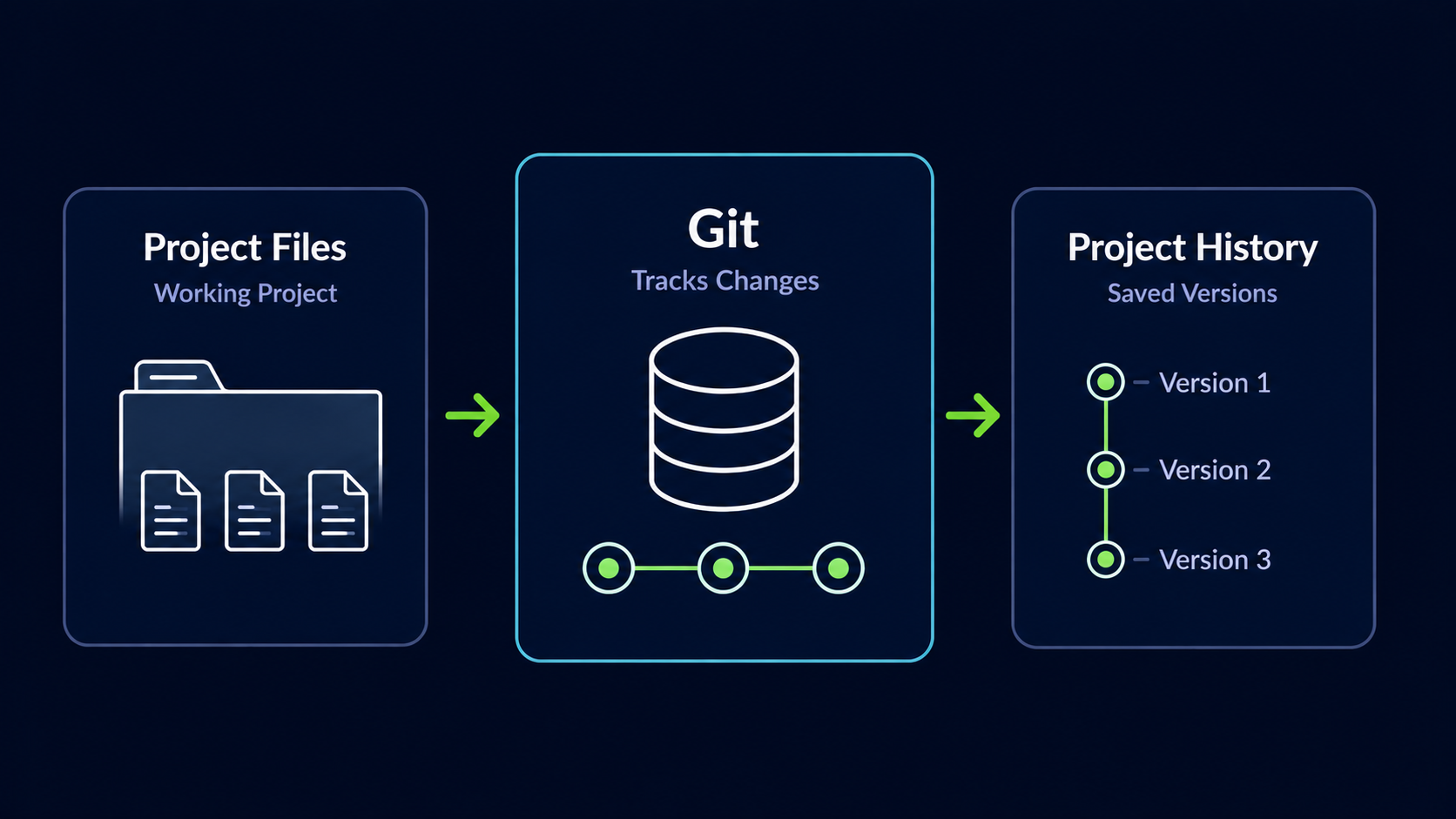
Git is a version control system that helps developers track changes to files over time. Instead of creating multiple copies of a project whenever something changes, Git records a structured history of your work so you can review, compare, restore, and share changes whenever needed.
Today Git is one of the most widely used tools in software development. Whether you are building a personal website, a mobile application, an API, or a large enterprise platform, Git provides a safe and organized way to manage change.
Life Before Git
Imagine spending several hours building a new feature for your project. Everything is working perfectly. Then you make a few additional changes and suddenly something breaks.
You start deleting code, undoing modifications, and trying to remember what worked before. The problem gets worse. Now you wish you could go back to the version of the project from two hours ago.
Before version control systems became common, developers often managed changes by creating multiple copies of project folders with names like project-final.php, project-final-v2.php, project-final-fixed.php, and project-final-really-final.php
Git was created to solve this problem by providing a reliable system for recording and managing changes over time.
What Is Version Control?
Version control is the practice of tracking changes to files over time. Instead of manually saving duplicate copies of a project, a version control system stores a complete history of modifications.
This history allows developers to review previous versions, identify when problems were introduced, and restore earlier states when necessary.
What Is Git?
Git is a distributed version control system. It tracks changes to files and stores those changes as part of a project's history. Every developer working with Git can have a complete copy of that history on their own computer.
Because Git works locally, developers can create commits, inspect history, create branches, and manage projects even before connecting to the internet.
Important Idea
Git is not simply a backup tool. It is a complete system for understanding and managing how a project changes over time.
What Can Git Track?
Git can track almost any type of file used in a software project.
- ✓ PHP files
- ✓ JavaScript files
- ✓ HTML files
- ✓ CSS files
- ✓ SQL scripts
- ✓ Configuration files
- ✓ Documentation
- ✓ Markdown files
- ✓ Project assets
Whenever a tracked file changes, Git can detect the modification and allow you to decide whether that change should become part of the project's history.
What Is a Git Repository?
A Git repository, often called a repository or repo, is the container that stores your project and its version history. It contains both your files and the historical record of changes made to those files.
Repository Example
Imagine you create a folder called portfolio-website. After turning it into a Git repository, every important change you make to that website can be recorded and stored as part of its history.
Unlike a normal folder, a Git repository remembers how a project evolved. It stores not only the current version of your files, but also the history of how those files changed over time.
Think of a Repository as a Time Machine
A repository stores both your current project and its history, allowing you to move backward and forward through the life of the project whenever needed.
Understanding Commits
A commit is a snapshot of your project at a specific moment in time. Each commit records changes and includes a message describing what was modified.
Example Commit Message
Added user authentication systemOver time, commits create a timeline of your project's evolution. This history helps developers understand changes, collaborate effectively, and recover from mistakes.
A Real Development Scenario
Building a Website
Imagine you are building a website for a client. On Monday the homepage works perfectly. On Tuesday you redesign the navigation menu and accidentally break several pages. Without Git, finding the exact change that caused the problem can be difficult. With Git, you can compare changes, inspect previous commits, and restore a working version if necessary.
This ability to safely experiment is one of the main reasons Git has become an essential tool for developers. It encourages exploration because mistakes can be identified and reversed instead of becoming permanent problems.
The Git Mental Model
One of the most useful ways to understand Git is to think of it as a process that moves changes through several stages before permanently saving them into history.
| Stage | Purpose |
|---|---|
| Working Directory | Files you are currently editing |
| Staging Area | Changes selected for the next commit |
| Commit | Permanent snapshot saved into project history |
Throughout the rest of this learning path, you will repeatedly work with these three stages. Understanding this flow early makes Git commands much easier to learn.
Git vs GitHub
One of the most common beginner misconceptions is thinking that Git and GitHub are the same thing. While they work together, they serve different purposes.
| Tool | Purpose | Where It Runs |
|---|---|---|
| Git | Tracks project changes and version history | On your computer |
| GitHub | Hosts Git repositories online and provides collaboration tools | In the cloud |
Easy Way to Remember
Git is the engine. GitHub is the online garage where developers store, share, and collaborate on projects.
Who Created Git?
Git was created by Linus Torvalds in 2005. Linus is also the creator of Linux, one of the most important operating systems in the world.
At the time, Linus needed a version control system capable of managing the Linux kernel project, which involved thousands of contributors and millions of lines of code.
Existing tools were either too slow, too restrictive, or not suited for the scale of the project. As a result, Linus created Git, which eventually became the most widely used version control system in software development.
Fun Fact
Git was originally created to solve the version control challenges of the Linux kernel project, one of the largest open-source software projects ever created.
Why Git Matters for Beginners
Learning Git early helps you build professional development habits. Instead of making random changes and hoping everything works, Git teaches you to work in small, organized, reversible steps.
Most professional software teams expect developers to understand repositories, commits, branches, merges, and collaboration workflows. Learning Git is one of the first steps toward working like a professional developer.
Understanding Git gives you the confidence to experiment, make changes safely, and collaborate effectively with other developers.
Conclusion
Every software project changes. New features are added, bugs are fixed, files are reorganized, and ideas evolve over time. Without a system for managing those changes, development quickly becomes chaotic.
Git brings structure to change. It records the history of a project, allows developers to recover from mistakes, and makes collaboration possible at every scale, from personal projects to some of the largest software systems in the world.
In this guide, you learned what version control is, why Git was created, how repositories and commits work, and how Git differs from GitHub. Every Git command you learn from this point forward builds on these ideas. Repositories, commits, project history, and version control form the foundation of the workflow used by millions of developers around the world.